

Employees frequently require official documentation, such as employment statements or salary confirmations, for mortgages, visa applications, and other personal administrative needs. Traditionally, these requests are handled manually by HR ticketing desks, leading to wait times for employees and repetitive tasks for HR staff. The Process Manager, part of the Foci platform, automates this through an Employee Self Service (ESS) workflow that generates verified documents instantly using data from SAP SuccessFactors.
The Challenge of Manual Document Requests
When an HR department manages document requests manually, they must verify employment status, fetch current payroll data, and format the information into a branded template. This manual process is inefficient and often leads to a backlog of simple administrative tasks. For the employee, the lack of an immediate solution can cause delays in their personal financial or legal matters.
The Solution: Automated Self Service Documents
The Process Manager serves as a digital extension that allows employees to request and receive official statements without HR intervention. By integrating directly with SAP SuccessFactors, the system ensures that every document generated is accurate and reflects the most recent data available.
Step 1: Employee Starts the Process
The journey begins with the employee, who can easily start the request directly from their dashboard. In this user friendly ESS interface, the employee simply confirms they want to request a statement of employment. Once confirmed, their part of the process is complete.
Step 2: Manager Verification and Input
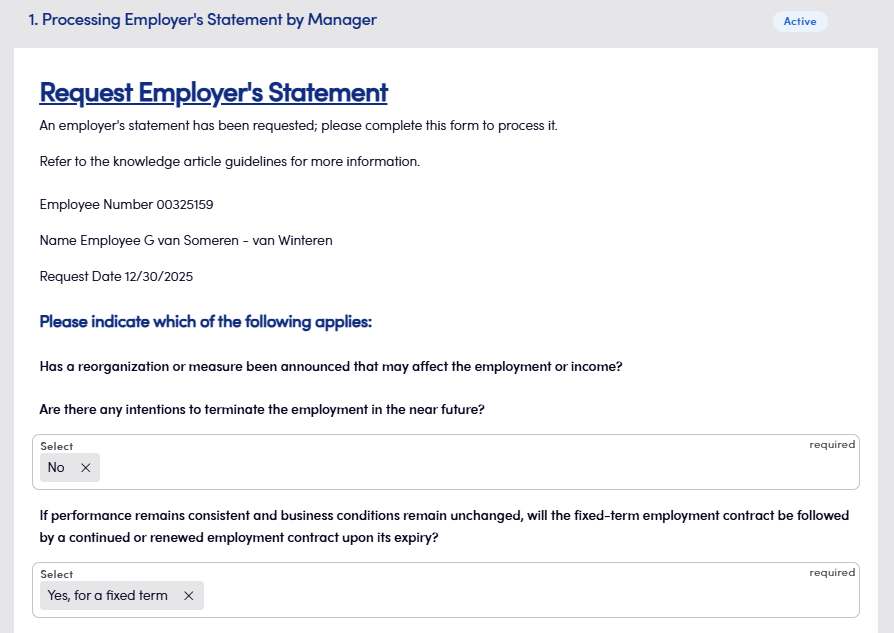
The manager receives a notification to complete the next step. The form automatically displays information pulled from SAP SuccessFactors, such as the employee’s name and personnel number. The manager then provides specific employment details required for legal statements, such as:
- Whether there are announced reorganizations affecting the employment or income.
- Whether there are intentions to terminate the employment in the near future.
- Whether a fixed term contract will be extended or renewed under unchanged conditions.
Step 3: Dynamic Salary Data Integration
Once the manager submits their input, the system performs a dynamic API request. This step automatically fetches and fills in all required salary information for the specific employee, ensuring that the financial details are accurate and up to date without manual searching.
Step 4: Payroll Verification
The payroll staff receives a notification to perform a final check of all the information gathered in the previous steps. This ensures that the automated salary data and the manager’s input are perfectly aligned before the document is finalized.
Step 5: Automated Document Creation
After payroll confirms the data, the system automatically populates a professional template with all the information collected throughout the workflow. The document is created instantly as a verified file, ensuring a consistent and branded output every time.
Step 6: Secure Delivery and Storage
The employee who initiated the request receives a notification that their document is ready. The final employment statement is safely stored within the platform and made available for the employee to download immediately, providing a high speed service for their personal needs.